Stats
Actions
Available In
Tags
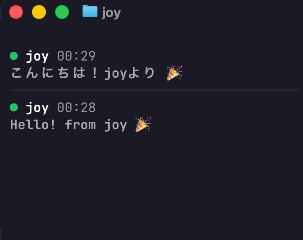
A terminal dashboard for monitoring Claude Code sessions in real-time.
Joy displays all active Claude Code sessions with their current state, project name, and latest message -- like a LINE/Slack unread indicator for your AI coding sessions.
npm i -g @yumazak/joy
joy
Joy starts a local HTTP server on 127.0.0.1:50055 and renders a TUI dashboard.
| Flag | Description | Default |
|---|---|---|
--port, -p | Port for the HTTP server | 50055 |
| Variable | Description | Default |
|---|---|---|
JOY_PORT | Port used by the hook script | 50055 |
JOY_URL | Full URL for the hook endpoint | http://127.0.0.1:${JOY_PORT}/hooks |
Install the joy-hooks plugin using the Claude Code CLI:
claude plugin marketplace add https://github.com/yumazak/joy
claude plugin install joy-hooks@joy
That's it! The plugin registers all necessary hooks automatically. Hooks silently do nothing when joy is not running, so no error messages will appear.
| State | Indicator | Description |
|---|---|---|
| Processing | 🔄 | Claude is actively working |
| WaitingApproval | 🟡 | Waiting for tool use approval |
| WaitingInput | 🟢 | Waiting for user input |
| Event | Maps to State |
|---|---|
PostToolUse | Processing |
PermissionRequest | WaitingApproval |
Stop / UserPromptSubmit | WaitingInput |
pnpm install
pnpm run dev      # Start development server
pnpm run test     # Run tests
pnpm run lint     # Run linter
MIT
Matches all tools
Hooks run on every tool call, not just specific ones
Own this plugin?
Verify ownership to unlock analytics, metadata editing, and a verified badge. GitHub access is read-only (username + org membership).
Sign in to claimOwn this plugin?
Verify ownership to unlock analytics, metadata editing, and a verified badge. GitHub access is read-only (username + org membership).
Sign in to claimBased on adoption, maintenance, documentation, and repository signals. Not a security audit or endorsement.
npx claudepluginhub yumazak/joy --plugin joy-hooksLive TUI dashboard for monitoring all active Claude Code sessions, status, context usage, tokens, and latest messages at a glance.
 DeanLa
Live multi-session dashboard for Claude Code — real-time visibility and control over every Claude Code session from a browser
 Jamie-BitFlight
Mission Control for Claude Code — auto-starts a web dashboard, provides 90 MCP tools (sessions, stats, live monitoring, projects, teams, insights, coaching, and more), and adds 9 skills including /session-recap, /daily-cost, /standup, /coaching, /insights, and /team-status.
 tombelieber
Real-time session dashboard for Claude Code — cost tracking, analytics, and smart alerts
 hyeongjun-dev
Session monitoring hooks for Bobber
 team9ai
Real-time statusline HUD for Claude Code - displays context usage, tool activity, agent tracking, and todo progress
 davepoon