Stats
Links
Categories
Fast Rust-powered statusline for Claude Code — context, git, tokens, cost, and session history.
npx claudepluginhub alyibrahim1/claude-statuslineAlways-visible statusline for Claude Code — context, git, tokens, cost. Rust binary, zero dependencies.
 AlyIbrahim1




A rich, fast statusline for Claude Code — shows model, git branch, context usage, rate limits, session cost, and split input/output token counts after every response.
Runs as a compiled Rust binary (~5ms startup vs ~100ms for Node.js). Zero shell dependencies. One install command.

npm install -g @alyibrahim/claude-statusline
Done. The statusline configures itself automatically. Restart Claude Code to see it.
If auto-setup didn't run:
claude-statusline setup
Plugin install (Claude Code marketplace): Search for claude-statusline in the Claude Code plugin browser. The plugin auto-configures on first session start. To get the native Rust binary after a plugin install, run:
claude-statusline download-binary
claude-statusline setup
Line 1 — Model name · Effort level · Active subagents · Current task · Directory (branch +commits) · Context bar
Line 2 — Weekly token usage · 5h usage · Reset countdown (Pro/Max) — or — Session cost (API key) · Session tokens X↓ Y↑
| Feature | Details |
|---|---|
| Context bar | Normalized to usable % — accounts for the auto-compact buffer |
| Rate limits | Shows 5h and weekly usage with color-coded thresholds |
| Session cost | Displayed only for API key users, hidden for subscribers |
| Session tokens | Real-time via JSONL offset caching — split input/output display (X↓ Y↑), formatted as k or M for large counts |
| Active agents | Counts running subagents from your ~/.claude/todos/ directory |
| Effort level | Reads CLAUDE_CODE_EFFORT_LEVEL env var or settings.json |
| Git branch | Detected automatically, silently absent if not a git repo |
| Session commits | Shows +N next to the branch for commits made during the current session |
| Directory label | Displays as ~/parent/dir so you always know which project you're in |
Track token usage, cost, and duration across every Claude Code session. Choose between a terminal-native TUI or a browser dashboard — your preference is saved automatically.
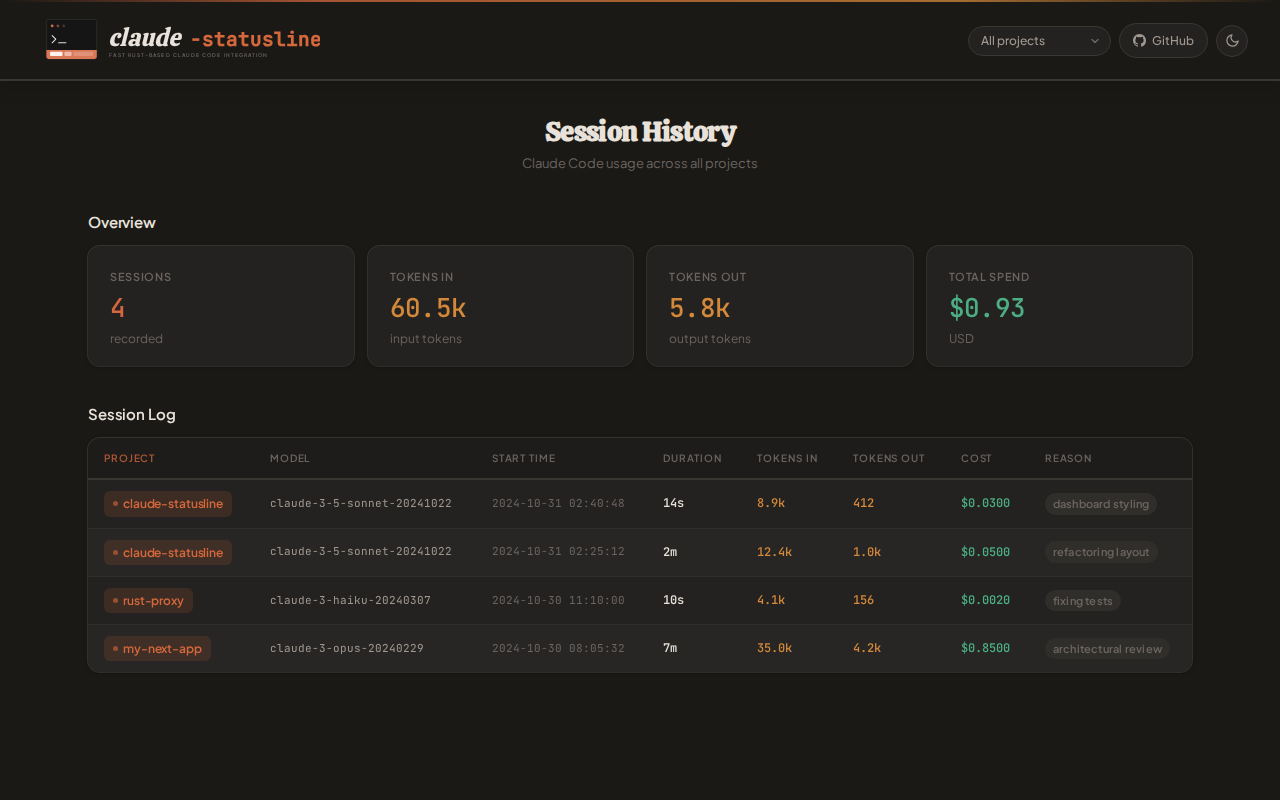
Session history is enabled by default on setup. Each session records:
| Field | Details |
|---|---|
| Project | Directory name and path |
| Model | Which Claude model was used |
| Tokens | Input and output counts |
| Cost | USD cost (API key users) |
| Duration | Session length in seconds |
| Exit reason | How the session ended |
Commands:
claude-statusline history                   # Open dashboard in saved mode (default: web)
claude-statusline history --mode terminal   # Switch to terminal TUI (persisted)
claude-statusline history --mode web        # Switch to browser dashboard (persisted)
claude-statusline enable-history            # Enable session tracking
claude-statusline disable-history           # Disable session tracking
Data is stored at ~/.claude/statusline-history.jsonl.
Commands are also available directly inside Claude Code as slash commands:
/history/history-enable/history-disable/history-mode <web|terminal>/download-binaryProject contributors get these from the repo at .claude/commands/.
Global npm installs copy them to ~/.claude/commands/ automatically.
Plugin installs include them via the plugin's commands/ directory.
--mode terminal opens an interactive full-screen dashboard directly in your terminal — no browser required. Requires the native Rust binary (falls back to web dashboard with a warning if unavailable).
RuFlo Marketplace: Claude Code native agents, swarms, workers, and MCP tools for continuous software engineering
No description available.
Code intelligence powered by a knowledge graph — execution flows, blast radius, and semantic search